 Security & Privacy
Passkeys, YubiKeys, and Hardware Auth: Security Guide
Practical guide to passkeys, YubiKeys, WebAuthn, recovery codes, synced vs device-bound credentials…
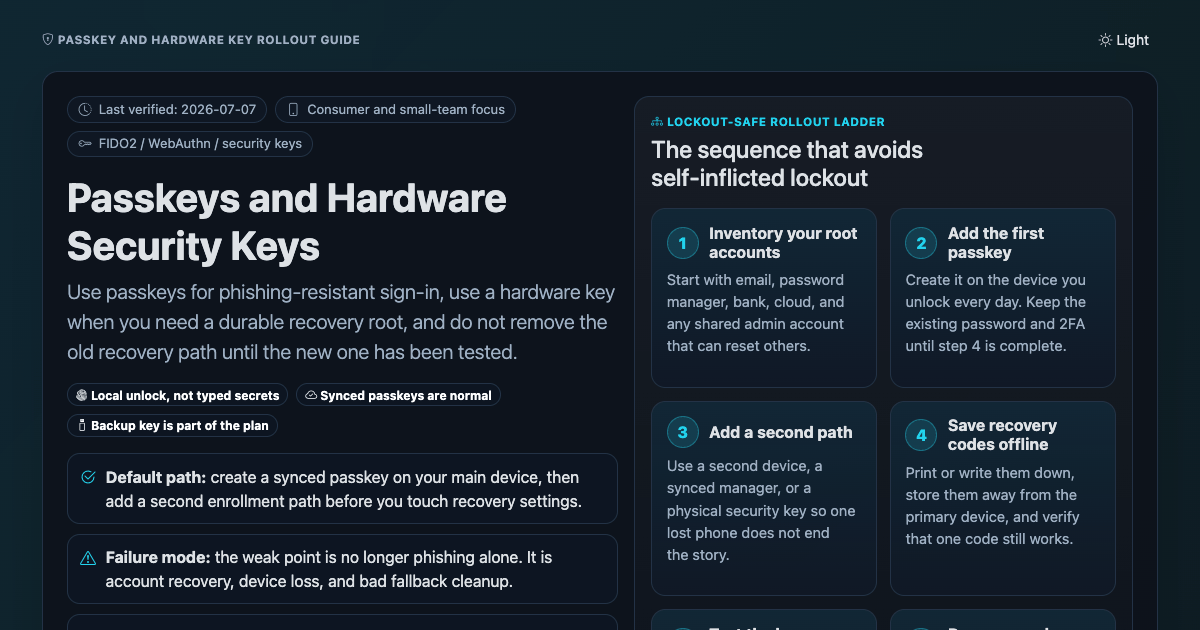
Comparison · DeviceJul 7, 2026 · upd Sep 18, 2026OpenFive pages, each built to be executed rather than read. The Linux hardening checklist is copy-paste commands in the order you run them on a fresh Ubuntu or Debian box. The passkeys page settles the synced-versus-device-bound question and what to do about recovery. The personal cybersecurity checklist is a threat model first and a tool list second, because most people buy tools for threats they do not have.
The data broker opt-out guide is the tedious one: a step-by-step US procedure for getting your records out of the people-search sites, with the forms and the timelines. Post-quantum cryptography covers the NIST standards and what a migration actually involves; it pairs with the custody-specific version in the crypto custody section.
5 references filed under Security & Privacy. Most read right now: Data Broker Opt-Out List: Nuwber, Spokeo, Whitepages & More; Passkeys, YubiKeys, and Hardware Auth: Security Guide; Personal Cybersecurity: A Practical Threat-Model Checklist.
Start here
Press ⌘K or / to search section headings.
Every sheet here is produced by a governed Claude Code pipeline: a version-controlled spec as acceptance criteria, primary-source research, a self-verification gate, and a public git audit trail. Read how it is built or browse the source on GitHub.
Security & PrivacyPractical guide to passkeys, YubiKeys, WebAuthn, recovery codes, synced vs device-bound credentials…
Comparison · DeviceJul 7, 2026 · upd Sep 18, 2026Open Security & Privacy
A personal cybersecurity checklist: password manager, phishing-resistant MFA and passkeys, email/phone…
Comparison · ProcedureJun 28, 2026 · upd Sep 18, 2026Open Security & Privacy
An interactive Linux/Ubuntu/Debian hardening checklist with copy-paste commands: SSH keys, ufw…
Comparison · ProcedureJun 16, 2026 · upd Sep 18, 2026Open Security & Privacy
Data broker opt-out list for US residents: step-by-step removal from Nuwber, BeenVerified, Spokeo…
Comparison · ProcedureMar 18, 2026 · upd Oct 25, 2026Open Security & Privacy
A comprehensive, interactive guide to post-quantum cryptography: NIST-standardized algorithms…
EssayMay 21, 2025 · upd Oct 25, 2026OpenNothing matches those filters. Clear them and start again.
The map draws itself with JavaScript, which is off. The grid below lists every sheet, and each sheet's detail view names its neighbours.
Drag to pan, scroll to zoom, double-click to reset. Click a node to open its detail. Colour is category; size is how much it is read this month.
Occasional email when a new reference ships or the pipeline changes. No spam, no tracking, unsubscribe anytime.